
My Autoplay enterprise13.2 - Download
You'll be able to download in few seconds.
Publisher Description
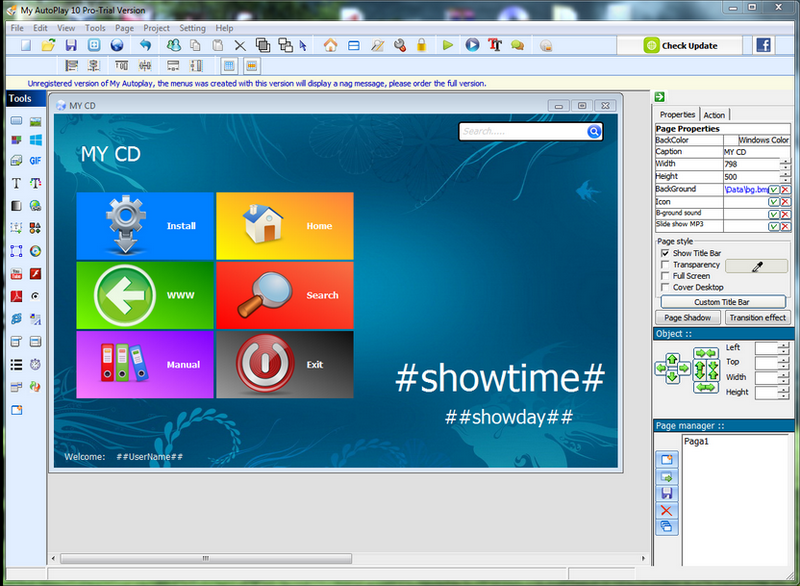
My Autoplay is one of popular and easy tools for creating professional autoplay menus, interactive presentations, multimedia applications, and custom software in just minutes without programming experience. Use your favorite content such as images, video, music, web, flash, text, buttons, Hyperlinks, and more!
The menu will pop up when your CD/DVD is inserted into the drive from menu you can launch applications, open documents, play movies files, open web site, send Email, run built in slide show with background sound file, and do much, much more.
Is best suited for creating autorun CDs, software CDs, CD catalogs, CD presentations, CD photo albums and slide-shows, E-Books, CD business cards and promotional CDs. It is an essential tool for software companies, retailers, photographers, designers, marketing and PR professionals. But you can use this tool at home as well to create family / wedding albums or home videos. Avid collectors may use this tool to create a CD catalog of the items they possess, search for, or would like to exchange with other collectors.
Just thinking, no programming.
Rapid development environment to create autoplay menus quickly.
Powerful WYSIWYG designer, easy to use without learning.
Easy testing without burning on disc.
About My Autoplay enterprise
This Multimedia Creation Tools program is available in English, Dutch, French, German, Portuguese, Spanish. It was last updated on 29 September, 2026. My Autoplay enterprise is compatible with the following operating systems: Windows.
The company that develops My Autoplay enterprise is Arafasoft. The latest version released by its developer is 13.2.
The download we have available for My Autoplay enterprise has a file size of 27.3 MB. Just click the green Download button above to start the downloading process. The program is listed on our website since 2017-01-10 and was downloaded 0 times. We have already checked if the download link is safe, however for your own protection we recommend that you scan the downloaded software with your antivirus. Your antivirus may detect the My Autoplay enterprise as malware if the download link is broken.
How to install My Autoplay enterprise on your Windows device:
- Click on the Download button on our website. This will start the download from the website of the developer.
- Once the My Autoplay enterprise is downloaded click on it to start the setup process (assuming you are on a desktop computer).
- When the installation is finished you should be able to see and run the program.
Program Details
General
System requirements
Download information
Pricing
Version History
version 13.2
posted on 2017-01-10
Fixed CD Key List Generator Issue.
version 2.11.0003
posted on 2007-02-20
Disclaimer
External Download
We do not host My Autoplay enterprise on our servers. We did not scan it for viruses, adware, spyware or other type of malware. This app is hosted by the software publisher and passed their terms and conditions to be listed there. We recommend caution when installing it.
The external download link for My Autoplay enterprise is provided to you by apps112.com without any warranties, representations or guarantees of any kind, so access it at your own risk.
If you have questions regarding this particular app contact the publisher directly. For questions about the functionalities of apps112.com contact us.
